Friday, May 29, 2020

Grandstand Adman TV Game 3000 - Now with COLOUR!

The 70's were a great time. The final Apollo missions. Skylab. Development of the shuttle. I was born etc etc etc. Good times.

But behind all the browns and headache inducing patterns the beginning of the computer games industry was taking place. First for the home came the Magnavox Odyssey, then Pong. Then someone cloned Pong to take advantage of an obvious market. Then someone else did. And another, and another. In fact, many Pong clones appeared. So many in fact, thanks to a couple of manufacturers who literally made Pong-on-a-chip. The most widely used of those was the General Instruments AY-3-8500. It's descendants appear in the Interstate console that I have (see HERE and HERE).

Well, GI wasn't the only company having a go at Pong-on-a-chip. Texas Instruments also had a go but with far more limited success. Their TMS-1965 chipset was not a huge success but was, strangely, pin compatible with the AY-3-8500.

So, anyway, a couple of weeks ago a box arrived.

What's in the box??

This is the Grandstand Adman TV Game 3000. It uses the TMS-1965 chipset and is surprisingly pleasing to look at. But I'm getting ahead of myself. There had been a 2000 model previously but the 3000 has colour (ooooh!) instead of just black and white. This is the late 70's though so expect greens, yellows and garish blues.

I bought it for the grand sum of £6.27 after realising that I have effectively been priced out of the market for most retro kit now. (An Amiga A500+ for £100??)

This particular unit has definitely been in storage in someones garage for some time judging by the state of it. It's very dusty and has that aroma that only a damp garage can generate.


Grungy..

Fortunately, this is quite a simple machine so I shouldn't have to worry too much about corrosion from errant capacitors or batteries.


Well, sh*t.

I spoke too soon. The unit had obviously been in storage for a heck of a long time. I haven't seen that style of battery for probably 20 years or more. But the question is, what damage has been done? Did I buy a £6.27 paperweight (that's no good as a paperweight without all that - er - weight)?


No Damage! - Phew!

Fortunately, the batteries in this console are to the front and below the main board(s). Also, I can only assume that the previous owner had it stored the correct way up otherwise we would have been looking at a total disaster.

Let's start the clean up. First, remove the case and snip off the controllers. They only have four wires each so it's easier to remove them for this work. I also left some wire on the board as these circuit boards are 40 years old and sticking a hot metal stick on them may cause unnecessary damage. It's much easier to solder two wires back together than try to repair a heat damaged trace. 


Controllers Separated

Next, remove the main halves of the case and wash them in warm, soapy water with the controller covers and let them dry through properly.


Washing Up

The case came out surprisingly well. I actually really like the look of this console. It may be from the 70's but the size and shape appeal to me far more than some 70's kit (looking at you Binatone...). I even managed to keep the 'QC' sticker. :)


Clean and Fresh.

Next thing to do is work out if this unit can output composite. It's an odd thing that most ancient games consoles generate a perfectly usable composite signal that is then hammered into RF. I suppose most TVs in the 70's and early 80's didn't have the array of inputs that modern TVs had. But in any case the pattern for this type of console is broadly similar:

1) Look for the TV modulator. It might be a silver box or even just a bit of circuit board but it will be where the TV output is.

2) Look for the two main connections into it. In most cases one lead will be for power to the modulator circuit and one will (probably) be the composite video signal.

To test this one I took my multimeter and plugged the unit in (9v D.C. centre pin negative a' la ZX Spectrum). Then I measured the voltage on both of the connections. One was a steady 5.01 volts and the other was wavering at about 1volt. So I disconnected both wires and connected the one with 1 volt to the centre pin of the TV out connector with a bit of orange wire. 

Orange Wire Composite Mod.


Will it work?


Looks good!

Of course. :)

So, now I'd proved it works all I had to do was re-attached the controllers and put it all back together.

There's not a lot to these...

Back in the case

Controllers attached and working

Done. Almost..


The only thing left to do with this is clean off the polystyrene from the cables. Apparently, the plastic on the cables contains a 'plasticizer' that leaches out of the plastic and gets absorbed by the polystyrene causing it to melt. The same happens if you wrap a cable around a plastic box. Eventually the cable starts to melt into the plastic.

I also have the box for this but it's in a really sorry state. I may have a go at repairing it and washing the polystyrene inserts. If I do I'll just update this post as I suspect a dedicated post about taping up a 40 year old box is possibly a bit dull, even for me... 

Monday, May 25, 2020

Unobtanium (next to the Thatwouldbehandium)

Some of you may remember the Interstate console that my awesome Dad gave me a while ago. It was, when presented, a bit dusty. But a good clean and one composite mod later and the thing sprang into life. Almost.

Pardon my (Dad's) Dust

The joysticks were a bit iffy and to try and improve things I ordered a super cheap donor console from eBay. These joysticks were physically the same but, when I dismantled them, I found that they were a few conductors short in their cables and they only had four of the potential six internal connections.

In any case, the joysticks were a suitable donor so I managed, after MUCH swearing and soldering, to get the attached to the correct cables and installed on my now cleaned console.


Joysticks Fully Repaired - About Time!

Pong. Yay!

So, the games on this thing are actually in the cartridges. While this may sound like a newsflash from the Ministry of the Bloomin' Obvious, the cartridges contain pretty much everything. The only thing in the console is the circuitry required to interface the controllers and marshal the video outputs from the cartridge into a coherent video signal. Everything else is done by the chip(s) on the cartridge i.e. the CPU is on the cartridge!

In this case, the '610' cartridge has an AY-3-8610 which contains 10 games. 

8610 - 10 Games on a chip

Other cartridges were allegedly available, but I had never seen them and I seriously began to doubt that they actually existed. Imagine my surprise then, when one of my eBay searches turned up this:

O. M. G.

Three cartridges, two that I had never seen before! I had to have this and, as luck would have it, the seller sent me an offer that I couldn't refuse. For some reason they only showed the Moto game in one picture which I queried. Apparently, the Moto game wouldn't work but the seller very kindly agreed to throw it in the box in case I could get it to work. Challenge accepted.

After a minor delay in despatch (lockdown and all that), the box arrived. It does mean I have two consoles but that was fine. More spares. But most importantly, all the cartridges were here. 

Squeee!

Hmmm - 604 has been opened... 

I have to be honest, I plugged in Roadrace to check it worked (it did) and then turned my attention to Moto Jump. First switch on attempt gave nothing, as if there was no cartridge inserted. I gave the contacts a good clean with some isopropyl alcohol and tried again. Partial success!

Signs of Life..

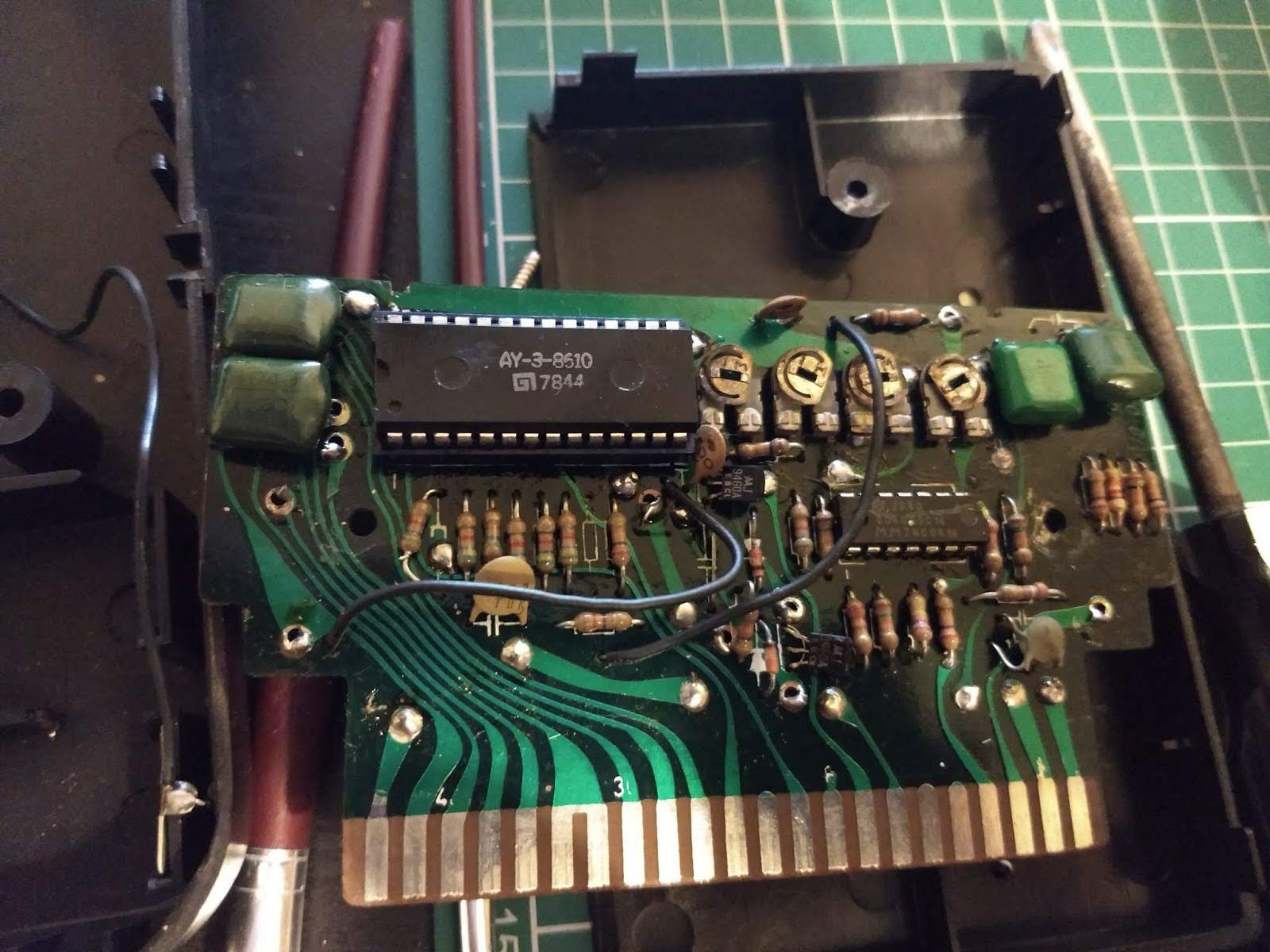
Something appeared on screen but I couldn't make anything move. The picture was pretty terrible too. Well, at least there's something to work with, so I cracked open the cartridge.

70's Goodness.

First things first. Change that socket for the AY-3-8765. It was really crusty and horrible. At this point I discovered that forty year old circuit boards are quite fragile. I had to turn the de-soldering station down, just a tad, to stop the tracks from lifting and shrivelling.

Caution - Fragile

I avoided any damage removing the socket and installed the new one without incident, although I didn't have any of the right width. I had to butcher a narrow socket with the correct number of pins, but it worked. :)

Hmm - somethings not quite right...

I won't tell if you don't..

I also noted that there was a logic chip too and it seemed only fair to give that one a socket too.

New socket - invaluable later.
At this point I tried again but ended up with the same problems. Really crappy picture (my display thought it was SECAM) and nothing happening, although I noticed that I could change the display slightly by pressing the 'Program' button. I decided to replace the caps on the board. There were no electrolytics but there were a few ceramics. But this didn't really change much although the picture did seem to become more stable.

So, I decided, what the heck, and I replaced all of the other passive components except for the one variable dude that I didn't have a replacement for.

No change.

I asked for some assistance from Twitter in that I wondered if the 8765 chip in the cartridge could be faulty but still work for some things i.e. changing the game type. The helpful response was that one of the pins, pin 18 to be exact, should have a signal of around 50 to 250khz to indicate the 'throttle' of the bike. If the signal was good there then the chances were, the 8765 chip was toast. Out came the sillyscope.

Well, that's not right.

There was no signal as such at pin 18 which indicated the issue was not the chip but something else in the cartridge. Phew! 

The only other thing I hadn't changed was the logic chip which was a CD4069. This is a CMOS Hex inverter. To determine if this was at fault I built a circuit (shamelessly copied from Google) to test it. Basically, I sent a voltage into one of the inputs and checked if the output was inverted. Pressing a switch would invert (or ground) the input. So, with the switch not pressed, the voltage into the input was 0v and the output would be 5v so the LED would light. If the switch was pressed the input voltage would be 5v and the output would be 0v so the LED would go out.

No switch press, 0v in, 5v out.

Switch press, 5v in, 0v out.

Doing this I managed to identify that pin 11 input to pin 10 output was open circuit so the LED stayed off all the time. By this point I'd spotted that the 610 cartridge also has a CD4069 so I nicked that to try. But I thought I'd test it in my contraption first. Would you believe that pin 9 input to pin 8 output was short circuit so the LED stayed on all the time. Arggghhh!

So, on to eBay to order some new ones. I managed to get three ceramic ones as NOS for a very reasonable £3.95. 

I love the smell of new chips in the morning.
Will it work?

Looks like a throttle signal to me.

Yes. Yes, it did. The game now works as expected. The operation is quite tricky as it needs the joystick to be pushed to the left (no throttle) and then to the right to accelerate. Kids today have it easy with their games. Back in my day etc. etc..


This has to be the rarest purchase I have ever made on eBay. I have had a search on 'Interstate' since my Dad handed over the console about 18 months ago and these are the ONLY cartridges I have ever seen. I'm pretty chuffed to have them in my collection.

Yay!


Post Script - I did the composite mod on the seller supplied console and it was this one that I did most of the testing for the Moto Jump game on. I was quite surprised when I plugged it into my original console to find that the picture was dark green rather than blue. I'm not sure why this is.

Green? Whatever..

Also, I worked out that the reason the picture kept going bad and switching to SECAM was not because of the cartridge. My re-purposed laptop display appears to be very intolerant to slightly out of spec composite signals... A normal TV has no issues.

Finally, I added a potentiometer to the speaker on my original console so I can reduce the volume. The speakers in these things are freakishly loud!


Shhhh!


Friday, November 29, 2019

My Second Apple Foray

Ebay. Love it or hate, it can be a source of some good stuff. In the past I've managed to get two CPCs and a Commodore Plus4 for less than £50 amongst other things. But recently, it's been hard to find anything that i would consider to be a 'decent' price.

Plenty of Amiga A500s but at £90 - £120? No thanks. What about an Amiga A1200? For three hundred quid?? That's almost back to it's original retail price (untested, worked when I put it away..)..

So imagine my surprise when I won an eBay auction for two iMac G3 computers from the late 90's for the princely sum of five of your English pounds. Yes, a fiver. Five knicker. The cost of a couple of large coffees. To be fair, they were collection only, as they are so heavy, and I was fortunate that they were located only about 25 minutes away.

A Right Pair of Beauties
Although the two models outwardly look the same, they are two different versions. There's a 'bondi blue' first generation model, and the next variation which is 'blueberry'. Outwardly there are a couple of more noticeable differences, starting with the CD drive. On the early model the CD drive has a drawer, similar to a drive you might find in any laptop from the early to mid 2000s (but not so much nowadays). The blueberry though, is a 'slot loader'.

My first investigation focused on the bondi blue model. This one is actually an early version of the first generation and I had a vain hope it may include an accelerator card. Sadly, it did not. However, it certainly contained a surprise - but I'm getting ahead of myself.

So, the first thing I did was plug it in and switch it on. I had half expected either nothing, or a loud bang. Fortunately, the only sound was a happy 'bong' that indicated a correct initial startup. The screen lit up and the machine proceeded to boot. Unfortunately, this one had Mac OSX installed which requires a password, long since forgotten by the previous owner. I googled how to sort this out but the method refused to work. In fact, on restarting the machine, it failed to boot, leaving me with a black screen. After a couple of hours of leaving it unplugged I tried again, and it booted!

But then I also noticed that the screen would 'tick' every now again and the screen would flicker slightly. This is bad news as it almost certainly means that the flyback transformer is on the way out, which is a major known issue with these things. There is a slight chance it could be capacitors on the analogue board but this is unlikely. In any case I decided to strip it down to have a look inside.

And then the horror began....

First, the rear cover was removed which revealed....a perfectly clean arrangement of CD and hard drive tray, power cables and monitor cable.

Nothing unusual here

OK. So next, remove the drive bay unit and see what's HOLY MOTHER OF GOD!

WHAT. THE. HELL.
Getting closer doesn't make it look any better..

Oh. My. Goodness.
Well, that was unexpected. The only hint that something might be wrong was that water dripped out of the rear shell. In hindsight, that should probably have given some clue as to the awfulness contained inside. Ok, I suppose I should take the lid off the drive bays and check the OH NO!!

Battery. Feckin' battery...

Graphic image. Discretion advised.
Well, I suppose I should not have been surprised. I suspect what has happened is that the unit has been stored underneath a water source. A leaky roof or something similar. With a heavy heart I started to clean up the board. The batter holder literally fell off in my hand.

The worst battery I've ever seen..
After a couple of hours of cleaning, I was stunned to find that, other than some slight lightening of the solder mask, there was no damage. Really.

Wow. It cleaned up OK.

After wiping and drying out everything that was wet, I decided to dig deeper and see if there was any obvious (!) issues on the analog board. This required me to discharge the CRT and dig much deeper into the guts and is a story for next time....

Tuesday, October 15, 2019

Problems, Problems, Problems

The classic format of a three act play is that part 1 is the setup, in part 2 everything goes to hell and a handbasket and part 3 provides redemption, closure, happy ending etc. My three part story follows similar lines but, in my case, everything goes wrong in this part....

So my A500++ purple beast is complete. I just need to pop him in the A500 case (which my regular readers may recognise as the scarlet Amiga case) and we're done.

First I need to get the current board out. Fetch me the screwdriver!

Get your top off!

Original A500+ Goodness

My favourite - removing hex bolts...

After half an hour of unscrewing, wiggling, more unscrewing, tea drinking and then screwing in many, many screws, I have the purple beast in a proper A500 case with a newly cleaned floppy drive. With gay abandon I plug everything in and switch it on expecting to be greeted by the familiar grey blue Workbench 2.04 as loaded from my external hard disk.

I was to be disappointed.

Dark grey, light grey....yellow. Arse. A yellow screen. What the heck is this? I've seen many yellow screens while repairing Amiga A500s, both Rev6 and Rev8. From my experience this means that there is either a faulty CIA or there is a problem with one of the pins on Agnus. So I undid all the screws, lifted out the floppy drive and swapped the CIAs.

This time I got a guru. I tried turning it on and off again. Yellow screen. Arrghhh!!

Guru, A500+ style...

So, not the CIAs. What about Agnus? I had thought that the socket I had was fine, even though it had been recovered from the old A500+ board. I raised Agnus in the socket slightly by delicate use of a small screwdriver (being careful not to damage the socket). Then went for another switch on. Purple boot screen! Yay!

I had solved all the problems. (Can you see what's coming?)

Except, I hadn't. Every third boot or so from cold resulted in a guru. And if I so much as looked at Agnus the wrong way I was guaranteed to receive a yellow screen at next boot for my trouble. There was nothing else to do, I had to find a different socket. Being the impatient person I am, I basically pinched the Agnus socket from a Rev6 board I have lying around. It was not as deep as the previous socket but Agnus sat down with a satisfying 'click' as I pushed her into its embrace.

Now I have solved all the problems..

Nope. No more yellow screen (so I was confident I was correct about the socket). But every third boot or so I would still get a guru message. This lead me to research what the heck the message was trying to tell me (see HERE for the results of that). Eventually I determined that two main gurus were appearing, one telling me that the CPU received an invalid instruction. This is usually caused by accidentally trying to execute data as the system is looking at the wrong memory location. The other was to do with incorrect crossing of odd byte boundaries which is not permitted on the 16 bit 68000 (it is allowed on later 68k series processors).

The common theme here was memory. So I took out the trapdoor 512 KB expansion and tried again. This time I got a green screen. FFS.

Green screen means that the system cannot initialise the first batch of chip memory. This is normally a failed RAM chip or an issue with the logic between Agnus and the RAM. But I'd already checked the logic chips and replaced one faulty one. To have a RAM chip fail as I put on the A500 case seems too much of a coincidence.

So I took the top case off, removed the keyboard and tried again. It booted. What. The. Heck.

I got hold of a Diagrom from eBay for a few quid to see if that would give me some clue as to what was going on at startup. Unfortunately, it didn't. All system parameters were fine and the RAM was reported as OK.

Your friendly neighbourhood DiagROM
I even tried hooking up the serial output from DiagROM to another Amiga to read the output and see if that would tell me anything extra. Sadly, it didn't but I did learn a lot about DiagROM in the process. :)

Two Amiga 500s ready to talk..
Heath-Robinson Null Modem Cable

Now we're talking...

Despite this I wasn't convinced that there were no issues (guru says otherwise) and decided to look more closely at the RAM. I removed half the RAM and had the thing boot as a 512KB chip RAM machine. Then I spent an hour swapping RAM chips around, putting them into all the possible combinations, trying to see of there was one dodgy chip or socket but to no avail.

As I put the keyboard and case back on I realised that the keyboard was fouling the RAM which I had put into sockets that were, on closer inspection, a bit tall...  After a bit of pushing and prodding I worked out that the left most RAM chip would lift out of its socket when the keyboard was put into place, presumably disconnecting far enough to prompt the green screen. Dangnabbit.

I took the decision to solder the first 512KB i.e. alternate chips, directly to the board. This would guarantee that the RAM would be connected and, having spent a joyful hour chip swapping I was confident that all of the RAM was fine anyway.

Half the RAM soldered direct

This made a difference and it booted without any more issues. So then I re-inserted the trap-door expansion, buttoned up the case and re-booted. Straight into a guru. WHhhhhaaaaattt?

A501 - Ready for action! Or not...

Re-booting brought up the purple boot screen so I tried the Amiga Test Kit which started without any problem. Despite my having the trapdoor 512KB and 512KB onboard the system would only see 512KB. After some headscratching I did a bit of research (via Google) and noticed a lot of advice to check that the _EXTICK (or _EXRAM) signal was present at the trapdoor connector. In my case it wasn't but could be connected via means of JP 7A. Which I did. Which was a mistake. It didn't work and caused me to have a mild panic as I was presented with a dark grey screen on boot followed by nothing... I removed the connection from JP 7A.

I tried cleaning the trapdoor connector as I had recovered it from the original A500+. Sure enough, several pins were dirty or had flux on them from its removal. A bit of IPA and a wipe was all that was needed to get them back to shiny again.

Despite this, nothing changed. The system would still not see the A501. So I put all of the RAM back on to the board making the full 1Mb with half socketed and half soldered. This time, I got a green screen. What. The. Heck.

While disassembling I noticed that one of the socketed RAM chips was making a bid for freedom. This was the final straw. I decided that I would solder ALL of the RAM to the main board.

And that solved it. It has been rock solid since then. I have had no gurus, no yellow screens, no green screens. The lesson here is that sockets are not always good. In my case I suspect that the 'competitively priced' product I ordered and received had a little too much height. Others have reported that good quality turned pin (i.e. round holes) sockets allowed the RAM to be installed without fouling the keyboard. Either way, my problems were solved and I can now enjoy my brand new purple beast.


In summary, the faults I had were:

1) Yellow screen - dodgy Agnus socket; different socket fitted
2) Random gurus - assumed to be a dirty trapdoor connector; cleaned
3) Green screen - RAM chips popping out of sockets; soldered the buggers to the board

Incidentally, I believe that the reason I could only see 512KB with half the RAM on the board and 512KB added via the trapdoor may be down to the system expecting the full 1MB in place before adding the trapdoor memory. That's an assumption on my part but both my 512KB expansions behaved exactly the same way, hence my decision to solder all of the on-board RAM directly to the board.

If you'd like to get your hands on a purple beast, head over to the following link:

https://www.tindie.com/stores/bobsbits/

In conclusion, this board is an awesome achievement by Rob Taylor. Kudos to him and the others who have the passion and dedication to keep the Amiga alive. In more ways than one...

Note: Post edited 24/01/21 to add revised URL for Rob's Tindie store where you can now also buy new C64 motherboards!